Really, the shape is ideal for long-term use. It’s fairly ergonomic, and it’s easy enough to lay your hand across with a relaxed grip. I found it to be a great option for raid nights in Destiny 2 (with as many as five or six Crota runs in one night) and more chill games like The Big Walk, where precision and agility take a bit of a back seat to consistency and comfort.
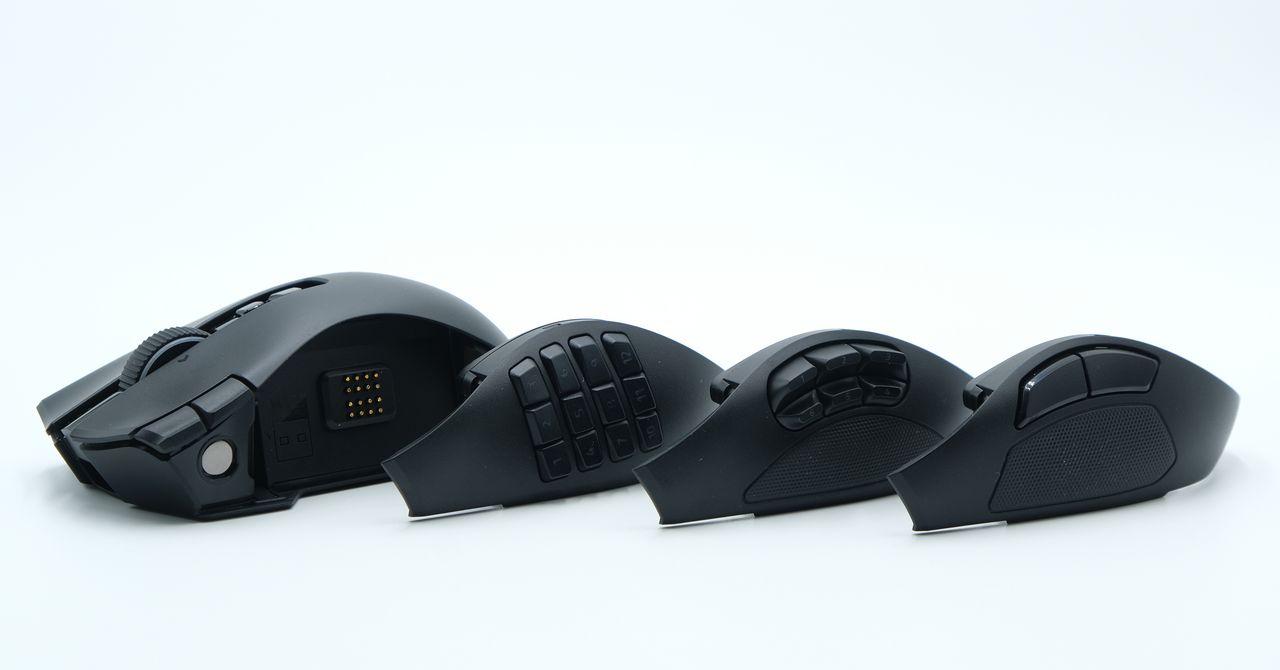
While the Naga V3 Pro weighs 116 grams with the heaviest twelve-button side panel (the six-button panel is 115 grams, and the two-button is 113), the mouse doesn’t feel particularly heavy. The weight is all kept fairly low, and is distributed well across the mouse. Compared to some older mice with high-up batteries and nose-heavy shapes, the Naga hardly feels like its weight; I would’ve guessed it was below 100 grams if I hadn’t checked. You’ll notice the added heft if you’re switching directly from a 60 gram gaming mouse, but otherwise, this mouse manages its mass very well.
One downside to its old-school vibe is the limited color options. Black is the only version available, and while that’ll always be the most popular (especially for Razer), a more niche mouse like the Naga V3 Pro could have definitely benefitted from another color.
So Many Buttons
This mouse has an absurd number of buttons. I found myself struggling to use all of them, but I’m sure there are quite a few people who still won’t think it’s quite enough.
Like the Logitech MX Master 4, the Naga incorporates a customizable mouse wheel with options for smooth or ratcheting operation, along with a “precision tactile” mode that decreases the space between each of the scrolling steps. The wheel also has a tilt function for horizontal scrolling; it’s ideal for spreadsheets and multimedia work that requires two axes of movement, but can just as easily be remapped to any number of macros (I could see it being useful for leaning to the left or right in a tactical shooter like Rainbow Six: Siege).
Drawing further comparisons to the MX Master line, I really found this mouse to be good for everyday work. The comfortable shape and extensive navigation capabilities made it great for multimedia work, and the number pad was ideal for mapping software-specific functions, especially for photo and video editing software that can require some repetitive and complex inputs.
Despite the sheer number of buttons, I really found that they never got in the way when not in use. All of them are placed in such a way to be easily accessible without disrupting the basic left and right click functionality. The only button I found myself regularly pressing on accident was the third click button, which can be locked entirely using a switch on the underside of the mouse.

Photograph: Henri Robbins